AddCal
What's New

Changelog

Stay up to date with the latest features, improvements, and bug fixes. We're constantly working to make AddCal better for you! 🎉

Feature

Improvement

February Updates: Smarter Series & Richer Content #

We’re kicking off February with powerful optimizations to help you manage event series and create more engaging pages.

New Features:

  • Extended Rich Text (WYSIWYG) Editor: We’ve upgraded the editor for Calendars and Events. You can now add tables, inline pictures, and code blocks to make your descriptions stand out.
  • Smart Event Series Inheritance: Editing a parent event now automatically updates all child events in the series—including links, images, and descriptions—saving you time on bulk updates.
  • Massive Language Expansion: Our translation engine now supports the top 20 most-spoken languages globally, ensuring your content is accessible to a worldwide audience.
  • Smart Subscription Alerts: To improve the user experience, we now alert users if they have already subscribed to a calendar. Instead of creating a duplicate entry, we simply reuse the existing subscription, keeping your data clean.

Other Improvements:

  • Image Cropping Fixes: Resolved issues with calendar and event image cropping for a sharper look.
  • Performance Tweaks: Backend optimizations to keep your dashboard fast, regardless of your event volume.


Improvement

Speak Their Language with Public Page Translations! 🌍 #

We’re happy to announce that all public calendar and event pages can now be translated into multiple languages, making your events more accessible to a global audience.

We are launching with support for French 🇫🇷, Spanish 🇪🇸, Hungarian 🇭🇺 and Hebrew 🇮🇱

🚀 Update: Language Expansion!

We've just added support for a huge range of new locales. You can now set your public pages to:

German 🇩🇪, Czech 🇨🇿, Portuguese 🇵🇹, Italian 🇮🇹, Dutch 🇳🇱, Polish 🇵🇱, Japanese 🇯🇵, Korean 🇰🇷, Turkish 🇹🇷, Russian 🇷🇺, Swedish 🇸🇪, and Arabic 🇦🇪.

How it Works

Your public-facing content—including event details, calendar views, and RSVP forms—will now adapt to your users' needs. We are also hard at work bringing these translations to our embedded calendars and buttons very soon!

Want to see your language added?

We want to support as many communities as possible. If there is a specific language you need for your audience, please reach out to us via live chat, and we will prioritize getting it added to the platform

Feature

Improvement

Bug Fix

Happy New Year! 🎉 Event Page Embedding & More #

We’re kicking off the year with a major new way to display your events, alongside some great performance and integration updates.

Event Page Embedding

You can now bring the full AddCal experience directly into your own website! With our new Event Page Embedding, you can embed both the event details and the RSVP form as a seamless part of your site. A premium subscription is required for this feature.

  • Smart Resizing: The embed script automatically handles height adjustments to ensure your content always fits perfectly without awkward scrollbars.
  • Keep Your Traffic: Keep visitors on your domain while providing the full functionality of an AddCal event page.
  • Easy Setup: Just grab the smart snippet and drop it into your CMS or custom HTML.

Other Improvements

  • Teams Meeting Buttons: Just like our Zoom integration, Microsoft Teams meeting links now automatically generate a prominent "Join Meeting" button on your event pages for a more professional look.
  • Management Performance: We've optimized the backend for the event and calendar management pages. If you’re a power user with hundreds (or thousands!) of events, you’ll notice significantly faster load times and smoother navigation.
  • Under-the-Hood Fixes: We've squashed several minor bugs to start the year with a clean slate.


Improvement

Feature

Improved Onboarding, Email 'Reply To', and API Updates #

We've rolled out a set of updates focused on improving the initial experience for new users and enhancing our integration capabilities.

  • New Onboarding Flow: We've designed a brand new onboarding experience to help new users quickly set up their first calendar and event, guiding them to key features for a faster start.
  • Custom 'Reply To' Email (Under Templates): You can now set a specific 'Reply To' email address within your Templates (Email Settings). This ensures that any replies to your RSVP confirmation and reminder emails go directly to the organizer's preferred inbox, streamlining communication.
  • API Improvements: We've expanded our API capabilities with new RSVP management endpoints, allowing for programmatic control over attendees. We've also undertaken a major documentation cleanup to make integration smoother and faster than ever.

Feature

🌐 Custom Domains #

You can now host your event and calendar pages on your own custom domain (e.g., events.yourcompany.com or schedule.mybrand.co).

This Business plan feature ensures full brand consistency and trust across every touchpoint.

Custom Domain Use Cases:

  • White Labeling: Deliver a completely branded experience where visitors never leave your domain, removing all third-party branding.
  • Brand Trust: Use a recognizable subdomain to increase user confidence in registration and subscription links.
  • SEO & Tracking: Maintain maximum SEO benefit and tracking consistency by keeping all your content under one root domain.

Feature

Improvement

Custom Forms for Calendar Subscribers #

We've extended the power of our custom field system to your calendar subscription pages!

You can now use Custom Subscription Forms to collect any additional information you need from visitors when they subscribe or follow your calendar. This brings all the flexibility of the RSVP form builder—including text fields, dropdowns, and marketing consent—to your subscriber management.

We've also added the ability to export your calendar subscribers, making it easy to integrate your audience data with external CRM or marketing systems! This gives you complete control over the data you collect and how you use it.

Improvement

Bug Fix

October Feature Rollup #

This month, we focused on delivering significant incremental improvements across the platform, including squashing lots of pesky bugs 🐞, to ensure a smoother experience as we prepare for some big features coming soon!

Here are the key enhancements rolled out:

  • API Event Filtering: You can now search and filter events programmatically using our updated API, giving you the power to build dynamic and responsive applications.
  • Delete Calendar Subscribers: Gain better control over your audience by having the option to delete calendar subscribers directly, which allows for a cleaner list management process than simply blocking.
  • Granular Series Management: For those using Event Series, you can now delete a specific individual event from the series without disrupting the recurring schedule.
  • Addevent Import Upgrades: We've made significant improvements to the import functionality to better support and map native features when migrating events from Addevent.
  • Custom RSVP Button Text: Personalize your event pages by customizing the text on the main RSVP button (e.g., change "RSVP Now" to "Register Here").
  • RSVP Button Control: Enhance attendee focus by configuring your custom RSVP forms to hide the 'Maybe' and/or 'Can't Go' buttons, simplifying the response choices.

Feature

Improvement

🔁 Event Series #

We've revolutionized how recurring events work with our new Event Series system. This major upgrade replaces the old event recurrence approach with a more intuitive and flexible way to manage your repeating events.

Unlike traditional recurring events, each event in a series is a real, standalone event that can be customized independently.

Key Advantages of Event Series

  • Individual Event Customization: Modify any event in a series without affecting other instances. Change the location for a single meeting or add special details to a holiday event with ease.
  • Independent RSVP Management: Every event in a series has its own unique RSVP list, attendee tracking, and capacity limits.
  • Perfect External Calendar Sync: Event Series solve common sync issues by ensuring each event syncs perfectly as an individual calendar entry, eliminating conflicts and ensuring perfect integration with Google, Outlook, and other calendars.

Plus, some other improvements:

  • Per-event RSVP: Now available for all events in a series.
  • Improved External Calendar Sync: Overall reliability and speed have been significantly boosted.
  • Date Filtering via API: You can now filter events by date when using our API.


Improvement

Free

Enhanced Recurrence Handling #

We've improved how recurring events are handled, giving you and your visitors more control over which events are added to their calendar.

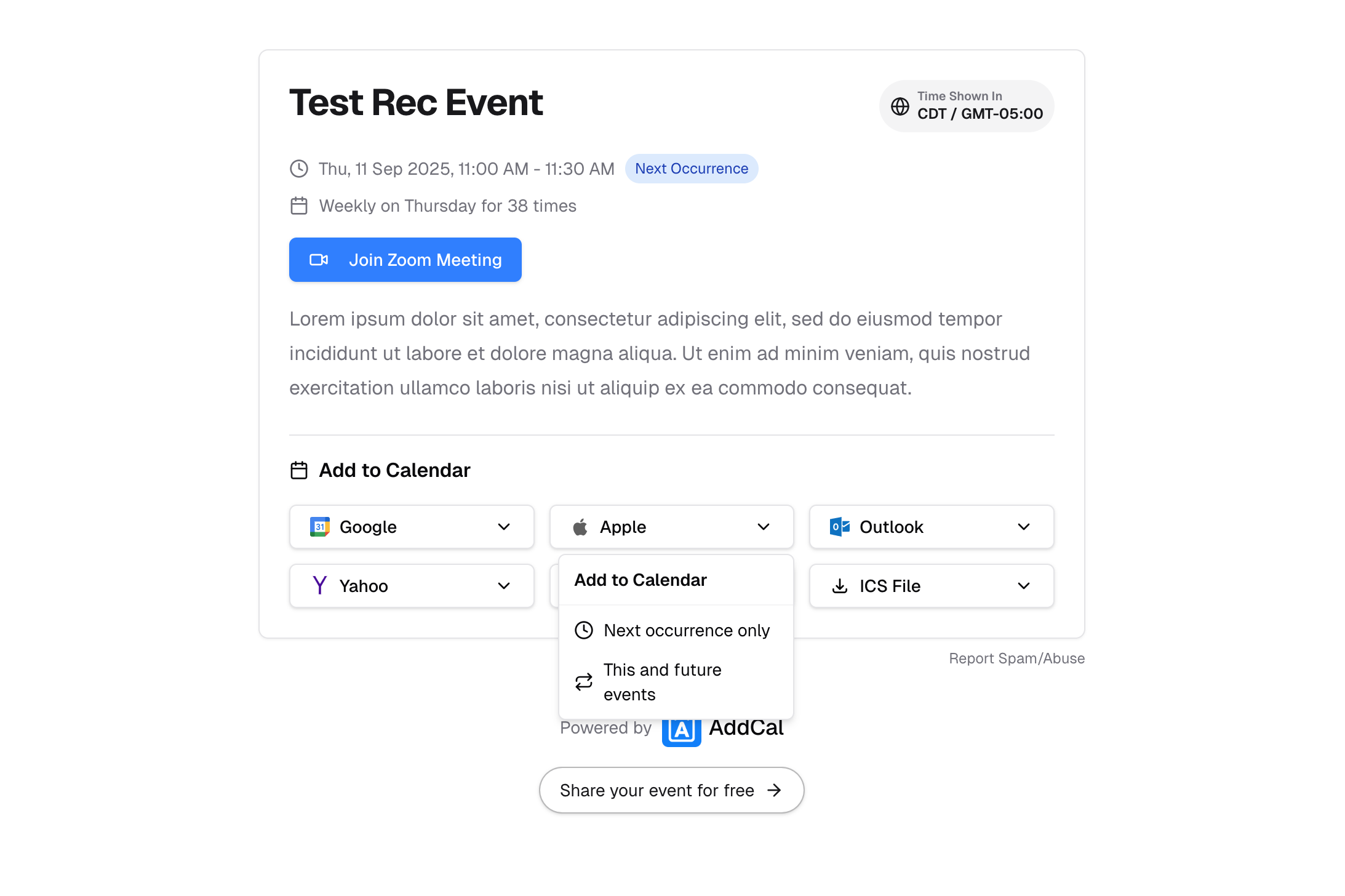
  • Selective Event Imports: When a visitor clicks the "Add to Calendar" button for a recurring event on both the event page and calendar page, they can now choose to add just the next upcoming occurrence or all future occurrences of the event. This allows them to keep their personal calendars clean while still staying up-to-date.
  • Improved Recurrence Display: Event pages now clearly show recurrence details, such as "Weekly on Thursday" as well as the date of the next upcoming recurrence. This helps visitors easily understand the event schedule.
Enhanced Recurrence Handling

Improvement

Enhanced Analytics Filtering #

We've upgraded our analytics engine to provide you with more accurate and powerful insights. Our new filtering system now automatically detects and excludes bot clicks, including those from email security checkers and other services that mimic browser behavior.

This change ensures that your traffic data is cleaner and more reflective of real human engagement. Your analytics should now be even more powerful and reliable.

If you notice any unexpected changes or have questions about the data, please don't hesitate to contact our support team.

Improvement

Enhanced Website Speed & SEO with Server-Side Rendering! #

We've implemented Server-Side Rendering (SSR) for your AddCal event and calendar pages, significantly boosting performance. This technical enhancement means faster load times, improved SEO through better search engine indexing, and more consistent performance across all devices. This upgrade delivers a foundational improvement for both your visitors and search engines.

Feature

🗂️ Spreadsheet Import #

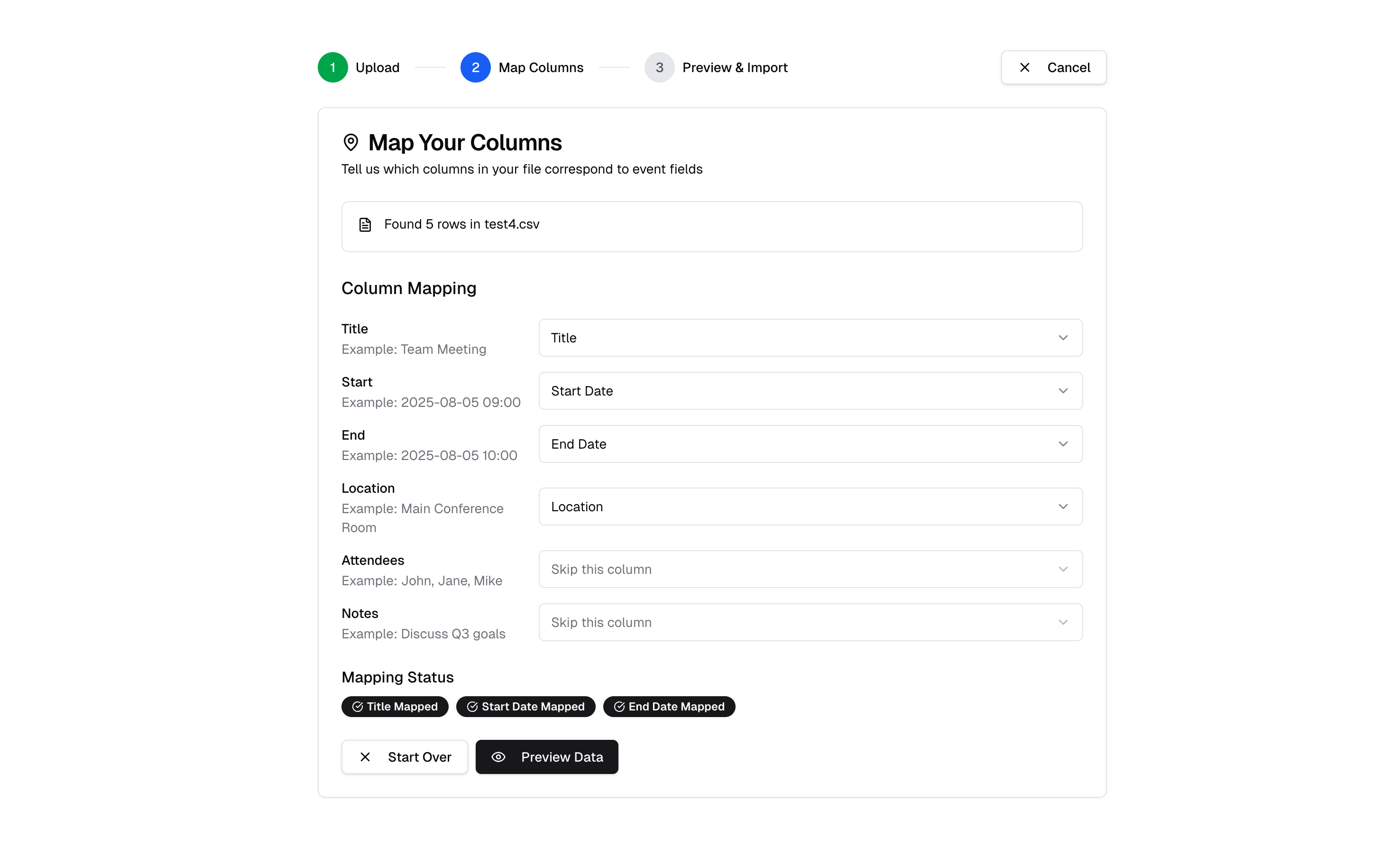
We're excited to introduce a powerful new Spreadsheet Import feature, allowing you to bulk upload events into your AddCal calendars using CSV or XLSX files!

Key capabilities include:

  • Bulk Upload: Easily import a large number of events by uploading your CSV or Excel file.
  • Flexible Field Mapping: Map columns from your spreadsheet to event fields like Title, Description, Location, Start Date, End Date, Timezone, and more.
  • Pre-Import Review: Get a comprehensive preview to review and adjust your column mappings before finalizing the import.
🗂️ Spreadsheet Import

Feature

Premium

⏰ Automated RSVP Email Reminders #

We're excited to introduce Automated Email Reminders for your events, a powerful new feature designed to boost attendance and keep your registered attendees informed! Now, event organizers on Business plans can automatically send timely reminder emails to their RSVP attendees before events begin.

Key features include:

  • Flexible Timing Options: Set reminders to send days or hours before your event (e.g., 1-7 days, 1-23 hours, or a combination).
  • Smart Processing: Reminders are sent automatically in the background, only once, and only for active, upcoming events.
  • Professional Emails: Reminder emails match your event branding, include event details, and attach a calendar file (.ics) for easy adding to attendees' calendars.

Feature

Free

📌 Event Tagging and Pinning #

We're excited to introduce Event Tagging and Pinning, giving you more control over how your events are organized and highlighted!

  • Event Tagging: You can now assign custom tags to your events. This allows for better categorization and organization, making it easier for you and your users to find specific types of events.
  • Event Pinning: Highlight important events by "pinning" them. Pinned events will appear at the top of your event lists, ensuring they get maximum visibility regardless of their date.


Improvement

Free

Duplicate Calendars #

We're introducing a new Duplicate Calendar feature, allowing you to quickly clone entire calendars with all their events and settings. This significant improvement saves you  time, making it perfect for creating templates, setting up seasonal events, or safely testing new configurations.

Improvement

📧 Custom RSVP Email Branding #

Custom RSVP Email Branding allows you to personalize your RSVP confirmation emails!

  • Use Your Logo & Custom Colors: Replace AddCal branding with your own logo, and select custom background and accent colors.
  • Setting a Custom "From" Name: Control the sender name displayed in the email.


Feature

RSVP Confirmation Emails #

We've introduced automated RSVP Confirmation Emails, ensuring your attendees receive immediate confirmation and essential event details after they RSVP! This is a Premium Feature.

Once someone responds to your event's RSVP, an automated email is sent with their response confirmation, an attached calendar event (.ics file) for easy adding, full event details, and direct links to view the event page or update their RSVP.


Feature

📋 Custom RSVP Forms #

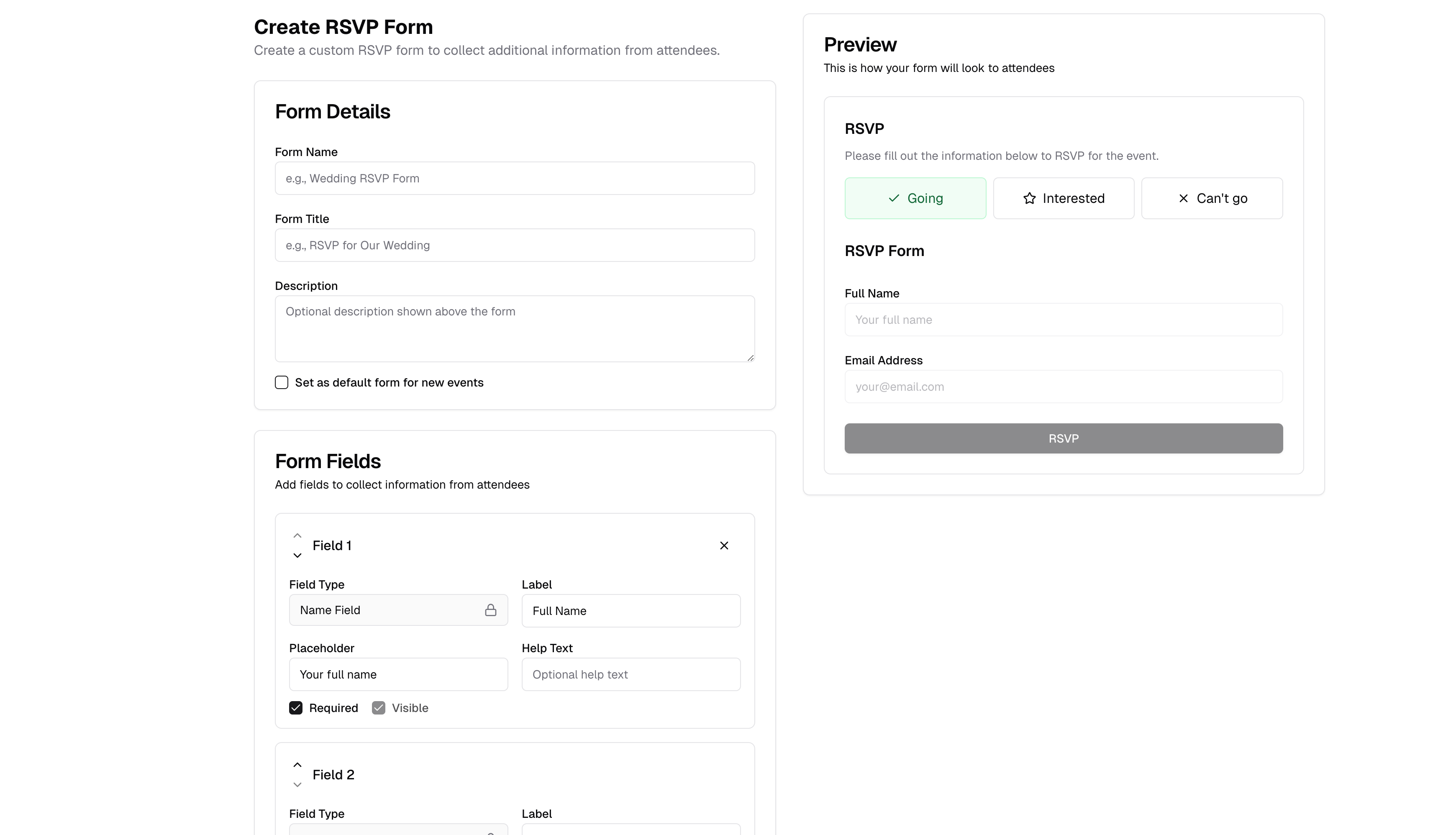
We're excited to announce Custom RSVP Forms, giving you the power to collect all the information you need from your event attendees!

Key capabilities include:

  • Tailored Fields: Add a variety of field types to your forms, such as text fields, number fields, dropdowns, radio buttons, dates, country selectors, US states, marketing consent checkboxes, and query string fields (which auto-populate from the URL).
  • Field Control: Set individual fields as required or optional, and choose whether they are visible to attendees.
  • Default Forms: Create a default RSVP form that can be automatically applied to all your new RSVP events.
📋 Custom RSVP Forms